Upload photos to your profile
A clear photo helps people recognize you and start conversations with respect. This guide shows how to upload one or multiple photos, what happens after upload, and what images are allowed on MyTransgenderCupid.
Quick actions
Tip: If uploads fail, try a smaller JPG/PNG file and a different browser.
What happens after you upload?
- Your photo is added to your photos page immediately.
- Photos are reviewed before they become visible on your public profile.
- After approval, you can set a photo as your primary profile photo.
Best results
- Choose well-lit photos where you’re clearly visible.
- Use recent images that reflect you today.
- Avoid heavy filters and blurry screenshots.
How to upload a photo
You can upload photos from your photos page inside your account.
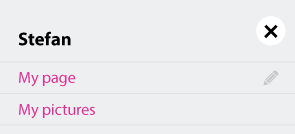
- Click your username in the top-right corner.
- Select My Photos from the menu.
- On your photos page, click the plus icon to add a photo.
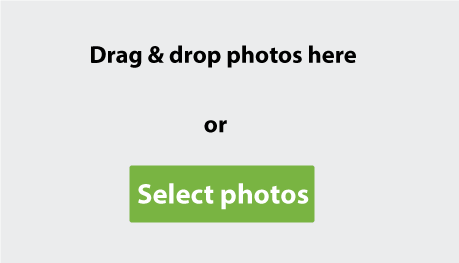
- Click the grey upload area (or the select button) and choose a file from your device.
Screenshots
These images show the exact screens you’ll see during upload.

Upload multiple photos at once
If you prefer, you can add several photos in one go.
- Open the upload screen from your photos page.
- Drag and drop multiple images into the grey upload area.
- Wait for the upload to finish, then review your photos list.
Simple quality checklist
- Good lighting and sharp focus
- Your face is visible in at least one photo
- No contact details in the image
- No nudity or explicit sexual content
Prefer a PDF version?
Open the PDF guide to read it later.
FAQ: Uploading photos
Quick answers about uploads, approval, and photo rules.
Photos help real people feel confident they’re talking to a genuine member. A clear primary photo also improves visibility and makes it easier to start respectful conversations.
Yes. On the upload screen, you can select multiple images or drag and drop several photos into the upload area. After upload, you can edit, rotate, or set a primary photo.
We manually review photos to reduce fake profiles and keep the platform respectful. Most photos are approved within a short timeframe, but review time can vary during busy periods.
Common causes are file size, unsupported format, slow connection, or a browser issue. Try a smaller JPG/PNG file, refresh the page, or switch browsers. If the issue continues, contact support with your device and browser details.
Allowed
- Real, clear photos that show you and reflect who you are.
- At least one photo where your face is clearly visible.
- Respectful images appropriate for a dating platform.
- Everyday photos: casual, hobbies, travel, or a simple selfie.
Not allowed
- Nudity, explicit sexual content, or pornographic images.
- Any image showing genitals or explicit sexual acts (may lead to a permanent ban).
- Photos that are not you (other people, celebrities, stock images, edited fakes).
- Images that include contact details, watermarks, ads, or promotional text.
No unsolicited nude content. Uploading nude or explicit photos is not allowed and may lead to an immediate lifetime ban. If you receive unwanted content, stop engaging and use block/report tools.
Go to your photos page, click the photo you want to use, and choose the option to set it as your primary photo. You may be asked to crop the image so your face is clear.
Next step
After your photos are uploaded, you can manage them any time from your photos page.